
How do I save my photos for ChromaLuxe ?
A perfect ChromaLuxe print starts with a digital file, saved with the best possible settings. Learn here more what settings you should use on your device.
All photos we produce are made with a digital camera. That camera can be a point and shoot consumer camera, a DSLR, a mirrorless high-end camera, or a smartphone (iPhone/Android).
Here we have already the first distinction: when using a consumer camera or smartphone, it will save your digital photo in a compressed file format, called JPG and convert all colors into the sRGB color gamut.

Using JPG-sRGB means that your photo will be reduced in size, but also in print quality. JPG is an 8-bit format, meaning it can store information on up to 16 million shades of color.
When you have bought a high-end professional camera, the two main photo formats available are JPG and RAW. If you use the RAW-format, your digital photo will be saved in an uncompressed image file. Essentially the camera takes the image data from the sensor, and saves it in an unedited and uncompressed format on the memory card. This gives you the possibility to adjust white balance, remove noise or adjust the sharpness in Adobe Lightroom or the Capture One software.
Using RAW means that files are not compressed and that you keep the full camera gamut. RAW is an 16-bit format, meaning it can store between 68 billion and 4.3 trillion color shades (depending on the camera).
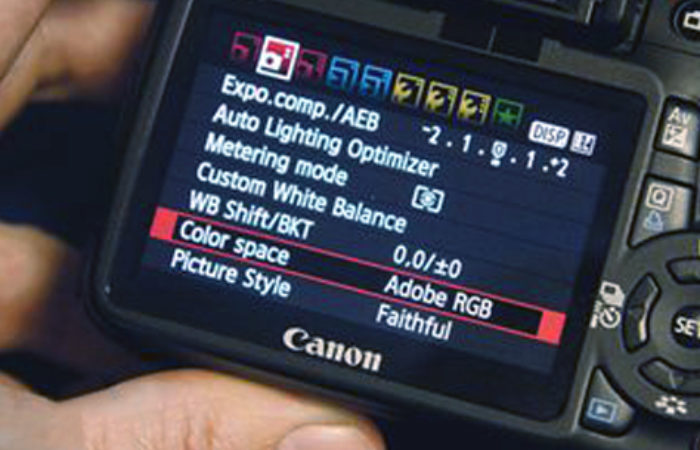
If you want to use JPG on your DSLR camera, you should verify the color space settings of your camera. By default it will use sRGB. As this sRGB color gamut is reducing the number of colors, you should change it to the bigger color gamut called Adobe RGB.
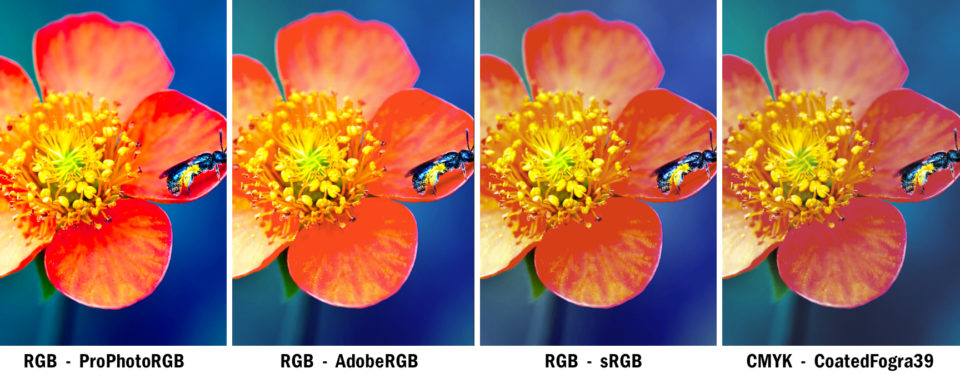
Check below photo to see the differences between color gamuts.
Do you want to read more?
Create your free account to receive access to our technical support portal.